

Yocto tests
← Older revision
Revision as of 19:15, 15 November 2013
Line 24:
Line 24:
git clone git://git.code.sf.net/p/elphel/meta-elphel393 meta-elphel393 git clone git://git.code.sf.net/p/elphel/meta-elphel393 meta-elphel393
git clone git://git.code.sf.net/p/elphel/meta-ezynq meta-ezynq git clone git://git.code.sf.net/p/elphel/meta-ezynq meta-ezynq
- git clone -b dylan https://github.com/openembedded/meta-oe.git+ git clone https://github.com/openembedded/meta-oe.git
</font> </font>
* Step 2: Init environment * Step 2: Init environment
Oleg
Elphel camera parts 0353-30
0353-30-24 - Silicone Gasket for M40.5 filter:
← Older revision Revision as of 21:25, 14 November 2013 (One intermediate revision not shown)Line 122: Line 122: ---- ---- -=== 0353-30-24 - Silicone Gasket for M40.5 filter ===+=== 0353-30-24 - Silicone Gasket for M40.5 filter (replaced with 0343-30-27) === t=0.8mm OD=42.5mm, ID=40mm, Cut from McMaster 2633T11 30A or equivalent t=0.8mm OD=42.5mm, ID=40mm, Cut from McMaster 2633T11 30A or equivalent {{Cad4|0353-30-24}} {{Cad4|0353-30-24}} ---- ---- + === 0353-30-25 - Silicone Gasket for M72 filter === === 0353-30-25 - Silicone Gasket for M72 filter === t=0.8mm OD=76mm, ID=71.5mm, Cut from McMaster 2633T11 30A or equivalent t=0.8mm OD=76mm, ID=71.5mm, Cut from McMaster 2633T11 30A or equivalent Line 132: Line 133: ---- ---- -=== 0353-30-27 - Silicone Gasket for M34 filter ===+=== 0353-30-27 - Silicone Gasket for M34 filter (used for M40.5 filter)=== t=0.8mm OD=36mm, ID=33.5mm, Cut from McMaster 2633T11 30A or equivalent t=0.8mm OD=36mm, ID=33.5mm, Cut from McMaster 2633T11 30A or equivalent {{Cad4|0353-30-27}} {{Cad4|0353-30-27}} OlgaYocto tests
Show changes
Oleg
Yocto tests
Add a patch to a recipe:
Show changes OlegYocto tests
Show changes
Oleg
Yocto tests
Show changes
Oleg
Yocto tests
Add a patch to a recipe:
Show changes OlegYocto tests
← Older revision
Revision as of 08:19, 12 November 2013
(10 intermediate revisions not shown)Line 3:
Line 3:
* Building Linux images for Zynq platform - ARMv7 * Building Linux images for Zynq platform - ARMv7
+==Output targets==
+These names are as they appear in the u-boot configuration header file - actual output files have different names:
+* '''boot.bin''' - u-boot as the first stage bootloader
+* '''devicetree.dtb''' - device tree with described interfaces, zynq registers, interrupts and drivers
+* '''uImage''' - kernel, drivers
+* '''uramdisk.image.gz''' - applications
+Copy them on the micro SD card > run '''boot''' once in the u-boot command line.
==GIT== ==GIT==
<font size='2'> <font size='2'>
git clone -b dylan git://git.yoctoproject.org/poky.git git clone -b dylan git://git.yoctoproject.org/poky.git
- git clone -b dylan https://github.com/Xilinx/meta-xilinx.git meta-xilinx+ cd poky (just for convenience)
+ git clone -b dylan https://github.com/Xilinx/meta-xilinx.git meta-xilinx (not needed)
git clone git://git.code.sf.net/p/elphel/meta-elphel393 meta-elphel393 git clone git://git.code.sf.net/p/elphel/meta-elphel393 meta-elphel393
+ git clone git://git.code.sf.net/p/elphel/meta-ezynq meta-ezynq
+ git clone -b dylan https://github.com/openembedded/meta-oe.git
</font> </font>
Line 21:
Line 31:
<absolute-path>/meta-xilinx/meta-zedboard \ <absolute-path>/meta-xilinx/meta-zedboard \
<absolute-path>/meta-elphel393 \ <absolute-path>/meta-elphel393 \
+ <absolute-path>/meta-ezynq \
</font> </font>
* Step 3: Edit ''build/conf/local.conf'' - set MACHINE and other things: * Step 3: Edit ''build/conf/local.conf'' - set MACHINE and other things:
Line 26:
Line 37:
BB_NUMBER_THREADS = "8" (depends on the PC's CPU) BB_NUMBER_THREADS = "8" (depends on the PC's CPU)
PARALLEL_MAKE = "-j 8" (depends on the PC's CPU) PARALLEL_MAKE = "-j 8" (depends on the PC's CPU)
- MACHINE ?= "zedboard"+ MACHINE ?= "elphel393" (based on MACHINE="zedboard" )
</font> </font>
====Notes==== ====Notes====
<font color="red"> <font color="red">
-*MACHINE="zedboard" is used to build the kernel. Doesn't matter for ramdisk.image.gz because the recipes don't have any bbappends for core-images.+* Does ''./oe-init-build-env'' scan all the meta-* dirs in poky? Unlikely.
+</font>
+
+==Build ezynq-u-boot==
+<font size='2'>
+ bitbake ezynq-u-boot
+</font>
+====Output====
+* boot.bin
+
+====Notes====
+<font color="red">
+* Is there a way to build it by running ''bitbake elphel393'' (elphel393 is the name of the ramdisk core image - currently coincides with the name of the MACHINE)
</font> </font>
Line 37:
Line 60:
bitbake linux-xlnx bitbake linux-xlnx
</font> </font>
+====Output====
+* uImage (kernel)
+* devicetree.dtb (or some *.dtb)
====Notes==== ====Notes====
<font color="red"> <font color="red">
-* The '''dtc''' script for converting device tree between *.dts and *.dtb formats is built along with the kernel.+* When linux-xlnx is 'clean' it is built with the ramdisk.image.gz by ''bitbake elphel393'', however the boot.bin does not, why?
</font> </font>
Line 47:
Line 73:
bitbake elphel393 bitbake elphel393
</font> </font>
+===Output====
+* uramdisk.image.gz (the file has *.u-boot extension after it's built)
+
====Notes==== ====Notes====
<font size='2'> <font size='2'>
Line 57:
Line 86:
IMAGE_INSTALL = "packagegroup-core-boot ${ROOTFS_PKGMANAGE_BOOTSTRAP} ${CORE_IMAGE_EXTRA_INSTALL}" IMAGE_INSTALL = "packagegroup-core-boot ${ROOTFS_PKGMANAGE_BOOTSTRAP} ${CORE_IMAGE_EXTRA_INSTALL}"
IMAGE_INSTALL_append = "python-core" IMAGE_INSTALL_append = "python-core"
-* Why ''python-core'' and not just ''python''?+* Why ''python-core'' and not ''python''?
-** ''poky/meta/recipes-devtools/python/python-2.7-manifest.inc'' has a list in PACKAGES items from which should go into IMAGE_INSTALL+** ''poky/meta/recipes-devtools/python/python-2.7-manifest.inc'' has a list in PACKAGES, items from which should go into IMAGE_INSTALL
** Among all there's no ''python'' in the PACKAGES list. ** Among all there's no ''python'' in the PACKAGES list.
** Does '''hob''' install all the PACKAGES if ''python'' is checked? Haven't tried, also the used '''hob''' version doesn't support saving recipes. ** Does '''hob''' install all the PACKAGES if ''python'' is checked? Haven't tried, also the used '''hob''' version doesn't support saving recipes.
-* '''(Is there a better solution?)''' Adding packages : '''apache2''', '''php''', '''i2c-tools''', '''mtd-utils''', '''net-tools''' steps:+* '''(Is there a better solution for kubuntu 13.04? in kubuntu 12.10 there are no errors mentioned below - or is it just newer version?)''' Steps for adding packages:
-**Clone '''meta-oe''' from OpenEmbedded: +**Clone '''meta-oe''' from OpenEmbedded (ia already cloned in the GIT-step):
git clone -b dylan https://github.com/openembedded/meta-oe.git git clone -b dylan https://github.com/openembedded/meta-oe.git
**Lines to ''bblayers.conf'': **Lines to ''bblayers.conf'':
<absolute-path>/meta-oe/meta-oe \ <absolute-path>/meta-oe/meta-oe \
- <absolute-path>/poky/meta-oe/meta-perl \
<absolute-path>/poky/meta-oe/meta-webserver \ <absolute-path>/poky/meta-oe/meta-webserver \
** ''elphel393.bb'' '''(some discussions mention the leading space is mandatory but somehow it works even without it)''': ** ''elphel393.bb'' '''(some discussions mention the leading space is mandatory but somehow it works even without it)''':
Line 73:
Line 101:
mtd-utils \ mtd-utils \
net-tools \ net-tools \
+ openssh \
modphp \ modphp \
apache2 \ apache2 \
Line 79:
Line 108:
meta-oe/meta-oe/recipes-devtools/php/php.inc: meta-oe/meta-oe/recipes-devtools/php/php.inc:
PACKAGES = "${PN}-dbg ${PN}-cli ${PN}-cgi ${PN}-fpm ${PN}-fpm-apache2 ${PN}-pear ${PN}-dev ${PN}-staticdev ${PN}-doc ${PN}" PACKAGES = "${PN}-dbg ${PN}-cli ${PN}-cgi ${PN}-fpm ${PN}-fpm-apache2 ${PN}-pear ${PN}-dev ${PN}-staticdev ${PN}-doc ${PN}"
-*** PACKAGES includes ''php''. What is installed? (No ''php-cli'': missing /usr/bin/php) Didn't investigate.+*** PACKAGES list includes ''php''. What is installed? (No ''php-cli'': missing /usr/bin/php) Didn't investigate.
*** What does hob build if ''php'' is checked? Didn't test. *** What does hob build if ''php'' is checked? Didn't test.
-*** Using ''php-cli'' installs php in the /usr/bin/. Tested.
*** Using ''php-cli'' increases the unpacked image size from ~16MB to ~50MB. *** Using ''php-cli'' increases the unpacked image size from ~16MB to ~50MB.
**To fix the '''ERROR'''="'''Could not inherit file classes/vala.bbclass'''" in bitbake copy vala.bbclass from oe-core? or delete the conflicting recipes (2?)? **To fix the '''ERROR'''="'''Could not inherit file classes/vala.bbclass'''" in bitbake copy vala.bbclass from oe-core? or delete the conflicting recipes (2?)?
**To fix the '''ERROR'''="'''Failed to parse krb5_1.11.3.bb'''" in bitbake delete the directory ''meta-oe/meta-oe/recipes-connectivity/krb5'' **To fix the '''ERROR'''="'''Failed to parse krb5_1.11.3.bb'''" in bitbake delete the directory ''meta-oe/meta-oe/recipes-connectivity/krb5''
+</font>
+</font>
====U-boot and device tree related notes==== ====U-boot and device tree related notes====
* '''The default UNPACKED ramdisk max size for zynq is 16MB - once it gets bigger you get KERNEL PANIC - the solution is [http://forums.xilinx.com/t5/Embedded-Linux/Need-bigger-ramdisk-32MB-on-ZC702/m-p/303457#M5775 modifying the device tree] - then recompile into DTB:''' * '''The default UNPACKED ramdisk max size for zynq is 16MB - once it gets bigger you get KERNEL PANIC - the solution is [http://forums.xilinx.com/t5/Embedded-Linux/Need-bigger-ramdisk-32MB-on-ZC702/m-p/303457#M5775 modifying the device tree] - then recompile into DTB:'''
*.dts, add to '''bootargs''' parameter ''ramdisk_size=32768'' (takes KB), example: *.dts, add to '''bootargs''' parameter ''ramdisk_size=32768'' (takes KB), example:
- bootargs = "console=ttyPS0,115200 root=/dev/ram rw ip=192.168.1.10 earlyprintk '''ramdisk_size=32768'''";+ bootargs = "console=ttyPS0,115200 root=/dev/ram rw ip=192.168.1.10 earlyprintk '''ramdisk_size=65536'''";
* '''The default COMPRESSED ramdisk max size for zynq is 10MB set in u-boot''' - change according to your needs, example: * '''The default COMPRESSED ramdisk max size for zynq is 10MB set in u-boot''' - change according to your needs, example:
''zynq_zed.h'': ''zynq_zed.h'':
Line 102:
Line 132:
devicetree = 0x3000000 - 0x2A00000 = 0x600000 = 6MB devicetree = 0x3000000 - 0x2A00000 = 0x600000 = 6MB
-</font>+==Build everything all together==
-</font>+ bitbake ezynq-u-boot linux-xlnx elphel393
- +==Build toolchain (not necessary)==
-==Build toolchain==+
* Step 1: build * Step 1: build
<font size='2'> <font size='2'>
Oleg
Ezynq
← Older revision
Revision as of 02:43, 11 November 2013
Line 11:
Line 11:
* '''boot.bin''' (fsbl is not required to boot) * '''boot.bin''' (fsbl is not required to boot)
-==Install meta-toolchain (Ubuntu 13.04)==+==Install meta-toolchain (Kubuntu 13.04)==
* *
<font size='2'> <font size='2'>
Line 23:
Line 23:
* Run installation script in ''build/tmp/deploy/'' * Run installation script in ''build/tmp/deploy/''
-==Install ezynq (Ubuntu 13.04)==+==Install ezynq (Kubuntu 13.04)==
<font size='2'> <font size='2'>
git clone git://git.code.sf.net/p/elphel/ezynq ezynq git clone git://git.code.sf.net/p/elphel/ezynq ezynq
Oleg
Yocto tests
← Older revision
Revision as of 02:41, 11 November 2013
(12 intermediate revisions not shown)Line 1:
Line 1:
+==About==
+* All of the described things happen in Kubuntu 13.04
+* Building Linux images for Zynq platform - ARMv7
+
==GIT== ==GIT==
<font size='2'> <font size='2'>
git clone -b dylan git://git.yoctoproject.org/poky.git git clone -b dylan git://git.yoctoproject.org/poky.git
- git clone -b dylan https://github.com/Xilinx/meta-xilinx.git poky/meta-xilinx+ git clone -b dylan https://github.com/Xilinx/meta-xilinx.git meta-xilinx
- git clone git://git.code.sf.net/p/elphel/meta-elphel393 poky/meta-elphel393+ git clone git://git.code.sf.net/p/elphel/meta-elphel393 meta-elphel393
</font> </font>
Line 14:
Line 18:
* Step 2: Edit ''build/conf/bblayers.conf'' - add paths to BBLAYERS: * Step 2: Edit ''build/conf/bblayers.conf'' - add paths to BBLAYERS:
<font size='2'> <font size='2'>
- <absolute-path>/poky/meta-xilinx \+ <absolute-path>/meta-xilinx \
- <absolute-path>/poky/meta-xilinx/meta-zedboard \+ <absolute-path>/meta-xilinx/meta-zedboard \
- <absolute-path>/poky/meta-elphel393 \+ <absolute-path>/meta-elphel393 \
</font> </font>
* Step 3: Edit ''build/conf/local.conf'' - set MACHINE and other things: * Step 3: Edit ''build/conf/local.conf'' - set MACHINE and other things:
Line 22:
Line 26:
BB_NUMBER_THREADS = "8" (depends on the PC's CPU) BB_NUMBER_THREADS = "8" (depends on the PC's CPU)
PARALLEL_MAKE = "-j 8" (depends on the PC's CPU) PARALLEL_MAKE = "-j 8" (depends on the PC's CPU)
- MACHINE ?= "zedboard" '''(?)'''+ MACHINE ?= "zedboard"
+</font>
+====Notes====
+<font color="red">
+*MACHINE="zedboard" is used to build the kernel. Doesn't matter for ramdisk.image.gz because the recipes don't have any bbappends for core-images.
</font> </font>
Line 28:
Line 36:
<font size='2'> <font size='2'>
bitbake linux-xlnx bitbake linux-xlnx
+</font>
+
+====Notes====
+<font color="red">
+* The '''dtc''' script for converting device tree between *.dts and *.dtb formats is built along with the kernel.
</font> </font>
Line 33:
Line 46:
<font size='2'> <font size='2'>
bitbake elphel393 bitbake elphel393
+</font>
+====Notes====
+<font size='2'>
+<font color="red">
+* Current packages:
+ ''elphel393.bb'':
+ IMAGE_INSTALL = "packagegroup-core-boot python-core ${ROOTFS_PKGMANAGE_BOOTSTRAP} ${CORE_IMAGE_EXTRA_INSTALL}"
+* Also works:
+ ''elphel393.bb'':
+ IMAGE_INSTALL = "packagegroup-core-boot ${ROOTFS_PKGMANAGE_BOOTSTRAP} ${CORE_IMAGE_EXTRA_INSTALL}"
+ IMAGE_INSTALL_append = "python-core"
+* Why ''python-core'' and not just ''python''?
+** ''poky/meta/recipes-devtools/python/python-2.7-manifest.inc'' has a list in PACKAGES items from which should go into IMAGE_INSTALL
+** Among all there's no ''python'' in the PACKAGES list.
+** Does '''hob''' install all the PACKAGES if ''python'' is checked? Haven't tried, also the used '''hob''' version doesn't support saving recipes.
+* '''(Is there a better solution?)''' Adding packages : '''apache2''', '''php''', '''i2c-tools''', '''mtd-utils''', '''net-tools''' steps:
+**Clone '''meta-oe''' from OpenEmbedded:
+ git clone -b dylan https://github.com/openembedded/meta-oe.git
+**Lines to ''bblayers.conf'':
+ <absolute-path>/meta-oe/meta-oe \
+ <absolute-path>/poky/meta-oe/meta-perl \
+ <absolute-path>/poky/meta-oe/meta-webserver \
+** ''elphel393.bb'' '''(some discussions mention the leading space is mandatory but somehow it works even without it)''':
+ IMAGE_INSTALL_append = "'''<mandatory space?>'''python-core \
+ i2c-tools \
+ mtd-utils \
+ net-tools \
+ modphp \
+ apache2 \
+ php-cli"
+** Why ''php-cli'' and not just ''php''?
+ meta-oe/meta-oe/recipes-devtools/php/php.inc:
+ PACKAGES = "${PN}-dbg ${PN}-cli ${PN}-cgi ${PN}-fpm ${PN}-fpm-apache2 ${PN}-pear ${PN}-dev ${PN}-staticdev ${PN}-doc ${PN}"
+*** PACKAGES includes ''php''. What is installed? (No ''php-cli'': missing /usr/bin/php) Didn't investigate.
+*** What does hob build if ''php'' is checked? Didn't test.
+*** Using ''php-cli'' installs php in the /usr/bin/. Tested.
+*** Using ''php-cli'' increases the unpacked image size from ~16MB to ~50MB.
+**To fix the '''ERROR'''="'''Could not inherit file classes/vala.bbclass'''" in bitbake copy vala.bbclass from oe-core? or delete the conflicting recipes (2?)?
+**To fix the '''ERROR'''="'''Failed to parse krb5_1.11.3.bb'''" in bitbake delete the directory ''meta-oe/meta-oe/recipes-connectivity/krb5''
+====U-boot and device tree related notes====
+* '''The default UNPACKED ramdisk max size for zynq is 16MB - once it gets bigger you get KERNEL PANIC - the solution is [http://forums.xilinx.com/t5/Embedded-Linux/Need-bigger-ramdisk-32MB-on-ZC702/m-p/303457#M5775 modifying the device tree] - then recompile into DTB:'''
+ *.dts, add to '''bootargs''' parameter ''ramdisk_size=32768'' (takes KB), example:
+ bootargs = "console=ttyPS0,115200 root=/dev/ram rw ip=192.168.1.10 earlyprintk '''ramdisk_size=32768'''";
+* '''The default COMPRESSED ramdisk max size for zynq is 10MB set in u-boot''' - change according to your needs, example:
+ ''zynq_zed.h'':
+ "sdboot=echo Copying Linux from SD to RAM... && " \
+ "mmcinfo && " \
+ "fatload mmc 0 0x3000000 ${kernel_image} && " \
+ "fatload mmc 0 0x2A00000 ${devicetree_image} && " \
+ "fatload mmc 0 0x2000000 ${ramdisk_image} && " \
+ "bootm 0x3000000 0x2000000 0x2A00000\0" \
+
+ So, the max sizes:
+ compressed ramdisk = 0x2A00000 - 0x2000000 = 0xA00000 = 10MB
+ devicetree = 0x3000000 - 0x2A00000 = 0x600000 = 6MB
+
+</font>
</font> </font>
Oleg
Yocto tests
← Older revision
Revision as of 23:53, 8 November 2013
(9 intermediate revisions not shown)Line 1:
Line 1:
+==About==
+* All of the described things happen in Kubuntu 13.04
+* Building Linux images for Zynq platform - ARMv7
+
==GIT== ==GIT==
<font size='2'> <font size='2'>
git clone -b dylan git://git.yoctoproject.org/poky.git git clone -b dylan git://git.yoctoproject.org/poky.git
- git clone -b dylan https://github.com/Xilinx/meta-xilinx.git poky/meta-xilinx+ git clone -b dylan https://github.com/Xilinx/meta-xilinx.git meta-xilinx
- git clone git://git.code.sf.net/p/elphel/meta-elphel393 poky/meta-elphel393+ git clone git://git.code.sf.net/p/elphel/meta-elphel393 meta-elphel393
</font> </font>
Line 14:
Line 18:
* Step 2: Edit ''build/conf/bblayers.conf'' - add paths to BBLAYERS: * Step 2: Edit ''build/conf/bblayers.conf'' - add paths to BBLAYERS:
<font size='2'> <font size='2'>
- <absolute-path>/poky/meta-xilinx \+ <absolute-path>/meta-xilinx \
- <absolute-path>/poky/meta-xilinx/meta-zedboard \+ <absolute-path>/meta-xilinx/meta-zedboard \
- <absolute-path>/poky/meta-elphel393 \+ <absolute-path>/meta-elphel393 \
</font> </font>
* Step 3: Edit ''build/conf/local.conf'' - set MACHINE and other things: * Step 3: Edit ''build/conf/local.conf'' - set MACHINE and other things:
Line 22:
Line 26:
BB_NUMBER_THREADS = "8" (depends on the PC's CPU) BB_NUMBER_THREADS = "8" (depends on the PC's CPU)
PARALLEL_MAKE = "-j 8" (depends on the PC's CPU) PARALLEL_MAKE = "-j 8" (depends on the PC's CPU)
- MACHINE ?= "zedboard" '''(?)'''+ MACHINE ?= "zedboard"
+</font>
+===Notes===
+<font color="red">
+*MACHINE="zedboard" is used to build the kernel. Doesn't matter for ramdisk.image.gz because the recipes don't have any bbappends for core-images.
</font> </font>
Line 28:
Line 36:
<font size='2'> <font size='2'>
bitbake linux-xlnx bitbake linux-xlnx
+</font>
+
+===Notes===
+<font color="red">
+* The '''dtc''' script for converting device tree between *.dts and *.dtb formats is built along with the kernel.
</font> </font>
Line 33:
Line 46:
<font size='2'> <font size='2'>
bitbake elphel393 bitbake elphel393
+</font>
+===Notes===
+<font size='2'>
+<font color="red">
+* Current packages:
+ ''elphel393.bb'':
+ IMAGE_INSTALL = "packagegroup-core-boot python-core ${ROOTFS_PKGMANAGE_BOOTSTRAP} ${CORE_IMAGE_EXTRA_INSTALL}"
+* Also works:
+ ''elphel393.bb'':
+ IMAGE_INSTALL = "packagegroup-core-boot ${ROOTFS_PKGMANAGE_BOOTSTRAP} ${CORE_IMAGE_EXTRA_INSTALL}"
+ IMAGE_INSTALL_append = "python-core"
+* Why ''python-core'' and not just ''python''?
+** ''poky/meta/recipes-devtools/python/python-2.7-manifest.inc'' has a list in PACKAGES items from which should go into IMAGE_INSTALL
+** Among all there's no ''python'' in the PACKAGES list.
+** Does '''hob''' install all the PACKAGES if ''python'' is checked? Haven't tried, also the used '''hob''' version doesn't support saving recipes.
+* '''(Is there a better solution?)''' Adding packages : '''apache2''', '''php''', '''i2c-tools''', '''mtd-utils''', steps:
+**Clone '''meta-oe''' from OpenEmbedded:
+ git clone -b dylan https://github.com/openembedded/meta-oe.git
+**Lines to ''bblayers.conf'':
+ <absolute-path>/meta-oe/meta-oe \
+ <absolute-path>/poky/meta-oe/meta-perl \
+ <absolute-path>/poky/meta-oe/meta-webserver \
+** ''elphel393.bb'' '''(some discussions mention the leading space is mandatory but somehow it works even without it)''':
+ IMAGE_INSTALL_append = "'''<mandatory space?>'''python-core \
+ i2c-tools \
+ mtd-utils \
+ modphp \
+ apache2 \
+ php-cli"
+** Why ''php-cli'' and not just ''php''?
+ meta-oe/meta-oe/recipes-devtools/php/php.inc:
+ PACKAGES = "${PN}-dbg ${PN}-cli ${PN}-cgi ${PN}-fpm ${PN}-fpm-apache2 ${PN}-pear ${PN}-dev ${PN}-staticdev ${PN}-doc ${PN}"
+*** PACKAGES includes ''php''. What is installed? (No ''php-cli'': missing /usr/bin/php) Didn't investigate.
+*** What does hob build if ''php'' is checked? Didn't test.
+*** Using ''php-cli'' installs php in the /usr/bin/. Tested.
+*** Using ''php-cli'' increases the unpacked image size from ~16MB to ~50MB.
+**To fix the '''ERROR'''="'''Could not inherit file classes/vala.bbclass'''" in bitbake copy vala.bbclass from oe-core? or delete the conflicting recipes (2?)?
+**To fix the '''ERROR'''="'''Failed to parse krb5_1.11.3.bb'''" in bitbake delete the directory ''meta-oe/meta-oe/recipes-connectivity/krb5''
+===U-boot and device tree related notes===
+* '''The default UNPACKED ramdisk max size for zynq is 16MB - once it gets bigger you get KERNEL PANIC - the solution is [http://forums.xilinx.com/t5/Embedded-Linux/Need-bigger-ramdisk-32MB-on-ZC702/m-p/303457#M5775 modifying the device tree] - then recompile into DTB:'''
+ *.dts, add to '''bootargs''' parameter ''ramdisk_size=32768'' (takes KB), example:
+ bootargs = "console=ttyPS0,115200 root=/dev/ram rw ip=192.168.1.10 earlyprintk '''ramdisk_size=32768'''";
+* '''The default COMPRESSED ramdisk max size for zynq is 10MB set in u-boot''' - change according to your needs, example:
+ ''zynq_zed.h'':
+ "sdboot=echo Copying Linux from SD to RAM... && " \
+ "mmcinfo && " \
+ "fatload mmc 0 0x3000000 ${kernel_image} && " \
+ "fatload mmc 0 0x2A00000 ${devicetree_image} && " \
+ "fatload mmc 0 0x2000000 ${ramdisk_image} && " \
+ "bootm 0x3000000 0x2000000 0x2A00000\0" \
+
+ So, the max sizes:
+ compressed ramdisk = 0x2A00000 - 0x2000000 = 0xA00000 = 10MB
+ devicetree = 0x3000000 - 0x2A00000 = 0x600000 = 6MB
+
+</font>
</font> </font>
Oleg
Yocto tests
U-boot and device tree related notes:
← Older revision Revision as of 21:59, 8 November 2013 (8 intermediate revisions not shown)Line 1: Line 1: +==About== +* All of the described things happen in Kubuntu 13.04 +* Building Linux images for Zynq platform - ARMv7 + ==GIT== ==GIT== <font size='2'> <font size='2'> git clone -b dylan git://git.yoctoproject.org/poky.git git clone -b dylan git://git.yoctoproject.org/poky.git - git clone -b dylan https://github.com/Xilinx/meta-xilinx.git poky/meta-xilinx+ git clone -b dylan https://github.com/Xilinx/meta-xilinx.git meta-xilinx - git clone git://git.code.sf.net/p/elphel/meta-elphel393 poky/meta-elphel393+ git clone git://git.code.sf.net/p/elphel/meta-elphel393 meta-elphel393 </font> </font> Line 14: Line 18: * Step 2: Edit ''build/conf/bblayers.conf'' - add paths to BBLAYERS: * Step 2: Edit ''build/conf/bblayers.conf'' - add paths to BBLAYERS: <font size='2'> <font size='2'> - <absolute-path>/poky/meta-xilinx \+ <absolute-path>/meta-xilinx \ - <absolute-path>/poky/meta-xilinx/meta-zedboard \+ <absolute-path>/meta-xilinx/meta-zedboard \ - <absolute-path>/poky/meta-elphel393 \+ <absolute-path>/meta-elphel393 \ </font> </font> * Step 3: Edit ''build/conf/local.conf'' - set MACHINE and other things: * Step 3: Edit ''build/conf/local.conf'' - set MACHINE and other things: Line 22: Line 26: BB_NUMBER_THREADS = "8" (depends on the PC's CPU) BB_NUMBER_THREADS = "8" (depends on the PC's CPU) PARALLEL_MAKE = "-j 8" (depends on the PC's CPU) PARALLEL_MAKE = "-j 8" (depends on the PC's CPU) - MACHINE ?= "zedboard" '''(?)'''+ MACHINE ?= "zedboard" +</font> +===Notes=== +<font color="red"> +*MACHINE="zedboard" is used to build the kernel. Doesn't matter for ramdisk.image.gz because the recipes don't have any bbappends for core-images. </font> </font> Line 28: Line 36: <font size='2'> <font size='2'> bitbake linux-xlnx bitbake linux-xlnx +</font> + +===Notes=== +<font color="red"> +* The '''dtc''' script for converting device tree between *.dts and *.dtb formats is built along with the kernel. </font> </font> Line 33: Line 46: <font size='2'> <font size='2'> bitbake elphel393 bitbake elphel393 +</font> +===Notes=== +<font size='2'> +<font color="red"> +* Current packages: + ''elphel393.bb'': + IMAGE_INSTALL = "packagegroup-core-boot python-core ${ROOTFS_PKGMANAGE_BOOTSTRAP} ${CORE_IMAGE_EXTRA_INSTALL}" +* Also works: + ''elphel393.bb'': + IMAGE_INSTALL = "packagegroup-core-boot ${ROOTFS_PKGMANAGE_BOOTSTRAP} ${CORE_IMAGE_EXTRA_INSTALL}" + IMAGE_INSTALL_append = "python-core" +* Why ''python-core'' and not just ''python''? +** ''poky/meta/recipes-devtools/python/python-2.7-manifest.inc'' has a list in PACKAGES items from which should go into IMAGE_INSTALL +** Among all there's no ''python'' in the PACKAGES list. +** Does '''hob''' install all the PACKAGES if ''python'' is checked? Haven't tried, also the used '''hob''' version doesn't support saving recipes. +* '''(Is there a better solution?)''' Adding packages : '''apache2''', '''php''' and '''i2c-tools''', steps: +**Clone '''meta-oe''' from OpenEmbedded: + git clone -b dylan https://github.com/openembedded/meta-oe.git +**Lines to ''bblayers.conf'': + <absolute-path>/meta-oe/meta-oe \ + <absolute-path>/poky/meta-oe/meta-perl \ + <absolute-path>/poky/meta-oe/meta-webserver \ +** ''elphel393.bb'' '''(some discussions mention the leading space is mandatory but somehow it works even without it)''': + IMAGE_INSTALL_append = "'''<mandatory space?>'''python-core \ + i2c-tools \ + modphp \ + apache2 \ + php-cli" +** Why ''php-cli'' and not just ''php''? + meta-oe/meta-oe/recipes-devtools/php/php.inc: + PACKAGES = "${PN}-dbg ${PN}-cli ${PN}-cgi ${PN}-fpm ${PN}-fpm-apache2 ${PN}-pear ${PN}-dev ${PN}-staticdev ${PN}-doc ${PN}" +*** PACKAGES includes ''php''. What is installed? (No ''php-cli'': missing /usr/bin/php) Didn't investigate. +*** What does hob build if ''php'' is checked? Didn't test. +*** Using ''php-cli'' installs php in the /usr/bin/. Tested. +*** Using ''php-cli'' increases the unpacked image size from ~16MB to ~50MB. +**To fix the '''ERROR'''="'''Could not inherit file classes/vala.bbclass'''" in bitbake copy vala.bbclass from oe-core? or delete the conflicting recipes (2?)? +**To fix the '''ERROR'''="'''Failed to parse krb5_1.11.3.bb'''" in bitbake delete the directory ''meta-oe/meta-oe/recipes-connectivity/krb5'' +===U-boot and device tree related notes=== +* '''The default UNPACKED ramdisk max size for zynq is 16MB - once it gets bigger you get KERNEL PANIC - the solution is [http://forums.xilinx.com/t5/Embedded-Linux/Need-bigger-ramdisk-32MB-on-ZC702/m-p/303457#M5775 modifying the device tree] - then recompile into DTB:''' + *.dts, add to '''bootargs''' parameter ''ramdisk_size=32768'' (takes KB), example: + bootargs = "console=ttyPS0,115200 root=/dev/ram rw ip=192.168.1.10 earlyprintk '''ramdisk_size=32768'''"; +* '''The default COMPRESSED ramdisk max size for zynq is 10MB set in u-boot''' - change according to your needs, example: + ''zynq_zed.h'': + "sdboot=echo Copying Linux from SD to RAM... && " \ + "mmcinfo && " \ + "fatload mmc 0 0x3000000 ${kernel_image} && " \ + "fatload mmc 0 0x2A00000 ${devicetree_image} && " \ + "fatload mmc 0 0x2000000 ${ramdisk_image} && " \ + "bootm 0x3000000 0x2000000 0x2A00000\0" \ + + So, the max sizes: + compressed ramdisk = 0x2A00000 - 0x2000000 = 0xA00000 = 10MB + devicetree = 0x3000000 - 0x2A00000 = 0x600000 = 6MB + +</font> </font> </font> OlegYocto tests
← Older revision
Revision as of 21:18, 8 November 2013
(6 intermediate revisions not shown)Line 1:
Line 1:
+==About==
+* in Kubuntu 13.04
+* Building Linux images for Zynq platform - ARMv7
+
==GIT== ==GIT==
<font size='2'> <font size='2'>
git clone -b dylan git://git.yoctoproject.org/poky.git git clone -b dylan git://git.yoctoproject.org/poky.git
- git clone -b dylan https://github.com/Xilinx/meta-xilinx.git poky/meta-xilinx+ git clone -b dylan https://github.com/Xilinx/meta-xilinx.git meta-xilinx
- git clone git://git.code.sf.net/p/elphel/meta-elphel393 poky/meta-elphel393+ git clone git://git.code.sf.net/p/elphel/meta-elphel393 meta-elphel393
</font> </font>
Line 14:
Line 18:
* Step 2: Edit ''build/conf/bblayers.conf'' - add paths to BBLAYERS: * Step 2: Edit ''build/conf/bblayers.conf'' - add paths to BBLAYERS:
<font size='2'> <font size='2'>
- <absolute-path>/poky/meta-xilinx \+ <absolute-path>/meta-xilinx \
- <absolute-path>/poky/meta-xilinx/meta-zedboard \+ <absolute-path>/meta-xilinx/meta-zedboard \
- <absolute-path>/poky/meta-elphel393 \+ <absolute-path>/meta-elphel393 \
</font> </font>
* Step 3: Edit ''build/conf/local.conf'' - set MACHINE and other things: * Step 3: Edit ''build/conf/local.conf'' - set MACHINE and other things:
Line 22:
Line 26:
BB_NUMBER_THREADS = "8" (depends on the PC's CPU) BB_NUMBER_THREADS = "8" (depends on the PC's CPU)
PARALLEL_MAKE = "-j 8" (depends on the PC's CPU) PARALLEL_MAKE = "-j 8" (depends on the PC's CPU)
- MACHINE ?= "zedboard" '''(?)'''+ MACHINE ?= "zedboard"
+</font>
+===Notes===
+<font color="red">
+*MACHINE="zedboard" is used to build the kernel. Doesn't matter for ramdisk.image.gz because the recipes don't have any bbappends for core-images.
</font> </font>
Line 28:
Line 36:
<font size='2'> <font size='2'>
bitbake linux-xlnx bitbake linux-xlnx
+</font>
+
+===Notes===
+<font color="red">
+* The '''dtc''' script for converting device tree between *.dts and *.dtb formats is built along with the kernel.
</font> </font>
Line 33:
Line 46:
<font size='2'> <font size='2'>
bitbake elphel393 bitbake elphel393
+</font>
+===Notes===
+<font size='2'>
+<font color="red">
+* Current packages:
+ ''elphel393.bb'':
+ IMAGE_INSTALL = "packagegroup-core-boot python-core ${ROOTFS_PKGMANAGE_BOOTSTRAP} ${CORE_IMAGE_EXTRA_INSTALL}"
+* Also works:
+ ''elphel393.bb'':
+ IMAGE_INSTALL = "packagegroup-core-boot ${ROOTFS_PKGMANAGE_BOOTSTRAP} ${CORE_IMAGE_EXTRA_INSTALL}"
+ IMAGE_INSTALL_append = "python-core"
+* Why ''python-core'' and not just ''python''?
+** ''poky/meta/recipes-devtools/python/python-2.7-manifest.inc'' has a list in PACKAGES items from which should go into IMAGE_INSTALL
+** Among all there's no ''python'' in the PACKAGES list.
+** Does '''hob''' install all the PACKAGES if ''python'' is checked? Haven't tried, also the used '''hob''' version doesn't support saving recipes.
+* '''(Is there a better solution?)''' Adding packages : '''apache2''', '''php''' and '''i2c-tools''', steps:
+**Clone '''meta-oe''' from OpenEmbedded:
+ git clone -b dylan https://github.com/openembedded/meta-oe.git
+**Lines to ''bblayers.conf'':
+ <absolute-path>/meta-oe/meta-oe \
+ <absolute-path>/poky/meta-oe/meta-perl \
+ <absolute-path>/poky/meta-oe/meta-webserver \
+** ''elphel393.bb'' '''(some discussions mention the leading space is mandatory but somehow it works even without it)''':
+ IMAGE_INSTALL_append = "'''<mandatory space?>'''python-core \
+ i2c-tools \
+ modphp \
+ apache2 \
+ php-cli"
+** Why ''php-cli'' and not just ''php''?
+ meta-oe/meta-oe/recipes-devtools/php/php.inc:
+ PACKAGES = "${PN}-dbg ${PN}-cli ${PN}-cgi ${PN}-fpm ${PN}-fpm-apache2 ${PN}-pear ${PN}-dev ${PN}-staticdev ${PN}-doc ${PN}"
+*** PACKAGES includes ''php''. What is installed? (No ''php-cli'': missing /usr/bin/php) Didn't investigate.
+*** What does hob build if ''php'' is checked? Didn't test.
+*** Using ''php-cli'' installs php in the /usr/bin/. Tested.
+*** Using ''php-cli'' increases the unpacked image size from ~16MB to ~50MB.
+**To fix the '''ERROR'''="'''Could not inherit file classes/vala.bbclass'''" in bitbake copy vala.bbclass from oe-core? or delete the conflicting recipes (2?)?
+**To fix the '''ERROR'''="'''Failed to parse krb5_1.11.3.bb'''" in bitbake delete the directory ''meta-oe/meta-oe/recipes-connectivity/krb5''
+===U-boot and device tree related notes===
+* '''The default UNPACKED ramdisk max size for zynq is 16MB - once it gets bigger you get KERNEL PANIC - the solution is [http://forums.xilinx.com/t5/Embedded-Linux/Need-bigger-ramdisk-32MB-on-ZC702/m-p/303457#M5775 modifying the device tree] - then recompile into DTB:'''
+ *.dts, add to '''bootargs''' parameter ''ramdisk_size=32768'' (in KB), example:
+ bootargs = "console=ttyPS0,115200 root=/dev/ram rw ip=192.168.1.10 earlyprintk '''ramdisk_size=32768'''";
+* '''The default COMPRESSED ramdisk max size for zynq is 10MB set in u-boot''' - change according to your needs, example:
+ ''zynq_zed.h'':
+ "sdboot=echo Copying Linux from SD to RAM... && " \
+ "mmcinfo && " \
+ "fatload mmc 0 0x3000000 ${kernel_image} && " \
+ "fatload mmc 0 0x2A00000 ${devicetree_image} && " \
+ "fatload mmc 0 0x2000000 ${ramdisk_image} && " \
+ "bootm 0x3000000 0x2000000 0x2A00000\0" \
+
+ So, the max sizes:
+ compressed ramdisk = 0x2A00000 - 0x2000000 = 0xA00000 = 10MB
+ devicetree = 0x3000000 - 0x2A00000 = 0x600000 = 6MB
+
+</font>
</font> </font>
Oleg
Yocto tests
← Older revision
Revision as of 20:51, 8 November 2013
(5 intermediate revisions not shown)Line 1:
Line 1:
+==About==
+* in Kubuntu 13.04
+* Building Linux images for Zynq platform - ARMv7
+
==GIT== ==GIT==
<font size='2'> <font size='2'>
git clone -b dylan git://git.yoctoproject.org/poky.git git clone -b dylan git://git.yoctoproject.org/poky.git
- git clone -b dylan https://github.com/Xilinx/meta-xilinx.git poky/meta-xilinx+ git clone -b dylan https://github.com/Xilinx/meta-xilinx.git meta-xilinx
- git clone git://git.code.sf.net/p/elphel/meta-elphel393 poky/meta-elphel393+ git clone git://git.code.sf.net/p/elphel/meta-elphel393 meta-elphel393
</font> </font>
Line 14:
Line 18:
* Step 2: Edit ''build/conf/bblayers.conf'' - add paths to BBLAYERS: * Step 2: Edit ''build/conf/bblayers.conf'' - add paths to BBLAYERS:
<font size='2'> <font size='2'>
- <absolute-path>/poky/meta-xilinx \+ <absolute-path>/meta-xilinx \
- <absolute-path>/poky/meta-xilinx/meta-zedboard \+ <absolute-path>/meta-xilinx/meta-zedboard \
- <absolute-path>/poky/meta-elphel393 \+ <absolute-path>/meta-elphel393 \
</font> </font>
* Step 3: Edit ''build/conf/local.conf'' - set MACHINE and other things: * Step 3: Edit ''build/conf/local.conf'' - set MACHINE and other things:
Line 22:
Line 26:
BB_NUMBER_THREADS = "8" (depends on the PC's CPU) BB_NUMBER_THREADS = "8" (depends on the PC's CPU)
PARALLEL_MAKE = "-j 8" (depends on the PC's CPU) PARALLEL_MAKE = "-j 8" (depends on the PC's CPU)
- MACHINE ?= "zedboard" '''(?)'''+ MACHINE ?= "zedboard"
+</font>
+===Notes===
+<font color="red">
+*MACHINE="zedboard" is used to build the kernel. Doesn't matter for ramdisk.image.gz because the recipes don't have any bbappends for core-images.
</font> </font>
Line 33:
Line 41:
<font size='2'> <font size='2'>
bitbake elphel393 bitbake elphel393
+</font>
+===Notes===
+<font size='2'>
+<font color="red">
+* Current packages:
+ ''elphel393.bb'':
+ IMAGE_INSTALL = "packagegroup-core-boot python-core ${ROOTFS_PKGMANAGE_BOOTSTRAP} ${CORE_IMAGE_EXTRA_INSTALL}"
+* Also works:
+ ''elphel393.bb'':
+ IMAGE_INSTALL = "packagegroup-core-boot ${ROOTFS_PKGMANAGE_BOOTSTRAP} ${CORE_IMAGE_EXTRA_INSTALL}"
+ IMAGE_INSTALL_append = "python-core"
+* Why ''python-core'' and not just ''python''?
+** ''poky/meta/recipes-devtools/python/python-2.7-manifest.inc'' has a list in PACKAGES items from which should go into IMAGE_INSTALL
+** Among all there's no ''python'' in the PACKAGES list.
+** Does '''hob''' install all the PACKAGES if ''python'' is checked? Haven't tried, also the used '''hob''' version doesn't support saving recipes.
+* '''(Is there a better solution?)''' Adding packages : '''apache2''', '''php''' and '''i2c-tools''', steps:
+**Clone '''meta-oe''' from OpenEmbedded:
+ git clone -b dylan https://github.com/openembedded/meta-oe.git
+**Lines to ''bblayers.conf'':
+ <absolute-path>/meta-oe/meta-oe \
+ <absolute-path>/poky/meta-oe/meta-perl \
+ <absolute-path>/poky/meta-oe/meta-webserver \
+** ''elphel393.bb'' '''(some discussions mention the leading space is mandatory but somehow it works even without it)''':
+ IMAGE_INSTALL_append = "'''<mandatory space?>'''python-core \
+ i2c-tools \
+ modphp \
+ apache2 \
+ php-cli"
+** Why ''php-cli'' and not just ''php''?
+ meta-oe/meta-oe/recipes-devtools/php/php.inc:
+ PACKAGES = "${PN}-dbg ${PN}-cli ${PN}-cgi ${PN}-fpm ${PN}-fpm-apache2 ${PN}-pear ${PN}-dev ${PN}-staticdev ${PN}-doc ${PN}"
+*** PACKAGES includes ''php''. What is installed? (No ''php-cli'': missing /usr/bin/php) Didn't investigate.
+*** What does hob build if ''php'' is checked? Didn't test.
+*** Using ''php-cli'' installs php in the /usr/bin/. Tested.
+*** Using ''php-cli'' increases the unpacked image size from ~16MB to ~50MB.
+**To fix the '''ERROR'''="'''Could not inherit file classes/vala.bbclass'''" in bitbake copy vala.bbclass from oe-core? or delete the conflicting recipes (2?)?
+**To fix the '''ERROR'''="'''Failed to parse krb5_1.11.3.bb'''" in bitbake delete the directory ''meta-oe/meta-oe/recipes-connectivity/krb5''
+===U-boot and device tree related notes===
+* '''The default UNPACKED ramdisk max size for zynq is 16MB - once it gets bigger you get KERNEL PANIC - the solution is [http://forums.xilinx.com/t5/Embedded-Linux/Need-bigger-ramdisk-32MB-on-ZC702/m-p/303457#M5775 modifying the device tree] - then recompile into DTB:'''
+ *.dts, add to '''bootargs''' parameter ''ramdisk_size=32768'' (in KB), example:
+ bootargs = "console=ttyPS0,115200 root=/dev/ram rw ip=192.168.1.10 earlyprintk '''ramdisk_size=32768'''";
+* '''The default COMPRESSED ramdisk max size for zynq is 10MB set in u-boot''' - change according to your needs, example:
+ ''zynq_zed.h'':
+ "sdboot=echo Copying Linux from SD to RAM... && " \
+ "mmcinfo && " \
+ "fatload mmc 0 0x3000000 ${kernel_image} && " \
+ "fatload mmc 0 0x2A00000 ${devicetree_image} && " \
+ "fatload mmc 0 0x2000000 ${ramdisk_image} && " \
+ "bootm 0x3000000 0x2000000 0x2A00000\0" \
+
+ So, the max sizes:
+ compressed ramdisk = 0x2A00000 - 0x2000000 = 0xA00000 = 10MB
+ devicetree = 0x3000000 - 0x2A00000 = 0x600000 = 6MB
+
+</font>
</font> </font>
Oleg
Yocto tests
← Older revision
Revision as of 19:35, 8 November 2013
(3 intermediate revisions not shown)Line 1:
Line 1:
+==About==
+* in Kubuntu 13.04
+* Building Linux images for Zynq platform - ARMv7
+
==GIT== ==GIT==
<font size='2'> <font size='2'>
git clone -b dylan git://git.yoctoproject.org/poky.git git clone -b dylan git://git.yoctoproject.org/poky.git
- git clone -b dylan https://github.com/Xilinx/meta-xilinx.git poky/meta-xilinx+ git clone -b dylan https://github.com/Xilinx/meta-xilinx.git meta-xilinx
- git clone git://git.code.sf.net/p/elphel/meta-elphel393 poky/meta-elphel393+ git clone git://git.code.sf.net/p/elphel/meta-elphel393 meta-elphel393
</font> </font>
Line 14:
Line 18:
* Step 2: Edit ''build/conf/bblayers.conf'' - add paths to BBLAYERS: * Step 2: Edit ''build/conf/bblayers.conf'' - add paths to BBLAYERS:
<font size='2'> <font size='2'>
- <absolute-path>/poky/meta-xilinx \+ <absolute-path>/meta-xilinx \
- <absolute-path>/poky/meta-xilinx/meta-zedboard \+ <absolute-path>/meta-xilinx/meta-zedboard \
- <absolute-path>/poky/meta-elphel393 \+ <absolute-path>/meta-elphel393 \
</font> </font>
* Step 3: Edit ''build/conf/local.conf'' - set MACHINE and other things: * Step 3: Edit ''build/conf/local.conf'' - set MACHINE and other things:
Line 22:
Line 26:
BB_NUMBER_THREADS = "8" (depends on the PC's CPU) BB_NUMBER_THREADS = "8" (depends on the PC's CPU)
PARALLEL_MAKE = "-j 8" (depends on the PC's CPU) PARALLEL_MAKE = "-j 8" (depends on the PC's CPU)
- MACHINE ?= "zedboard" '''(?)'''+ MACHINE ?= "zedboard"
+</font>
+===Notes===
+<font color="red">
+*MACHINE="zedboard" is used to build the kernel. Doesn't matter for ramdisk.image.gz because the recipes don't have any bbappends for core-images.
</font> </font>
Line 33:
Line 41:
<font size='2'> <font size='2'>
bitbake elphel393 bitbake elphel393
+</font>
+===Notes===
+<font size='2'>
+<font color="red">
+* Current packages:
+ ''elphel393.bb'':
+ IMAGE_INSTALL = "packagegroup-core-boot python-core ${ROOTFS_PKGMANAGE_BOOTSTRAP} ${CORE_IMAGE_EXTRA_INSTALL}"
+* Also works:
+ ''elphel393.bb'':
+ IMAGE_INSTALL = "packagegroup-core-boot ${ROOTFS_PKGMANAGE_BOOTSTRAP} ${CORE_IMAGE_EXTRA_INSTALL}"
+ IMAGE_INSTALL_append = "python-core"
+* Why ''python-core'' and not just ''python''?
+** ''poky/meta/recipes-devtools/python/python-2.7-manifest.inc'' has a list in PACKAGES items from which should go into IMAGE_INSTALL
+** Among all there's no ''python'' in the PACKAGES list.
+** Does '''hob''' install all the PACKAGES if ''python'' is checked? Haven't tried, also the used '''hob''' version doesn't support saving recipes.
+* '''(Is there a better solution?)''' Adding packages : '''apache2''', '''php''' and '''i2c-tools''', steps:
+**Clone '''meta-oe''' from OpenEmbedded:
+ git clone -b dylan https://github.com/openembedded/meta-oe.git
+**Lines to ''bblayers.conf'':
+ <absolute-path>/meta-oe/meta-oe \
+ <absolute-path>/poky/meta-oe/meta-perl \
+ <absolute-path>/poky/meta-oe/meta-webserver \
+** ''elphel393.bb'' '''(some discussions mention the leading space is mandatory but somehow it works even without it)''':
+ IMAGE_INSTALL_append = "'''<mandatory space?>'''python-core \
+ i2c-tools \
+ modphp \
+ apache2 \
+ php-cli"
+** Why ''php-cli'' and not just ''php''?
+ meta-oe/meta-oe/recipes-devtools/php/php.inc:
+ PACKAGES = "${PN}-dbg ${PN}-cli ${PN}-cgi ${PN}-fpm ${PN}-fpm-apache2 ${PN}-pear ${PN}-dev ${PN}-staticdev ${PN}-doc ${PN}"
+*** PACKAGES includes ''php''. What is installed? (No ''php-cli'': missing /usr/bin/php) Didn't investigate.
+*** What does hob build if ''php'' is checked? Didn't test.
+*** Using ''php-cli'' installs php in the /usr/bin/. Tested.
+*** Using ''php-cli'' increases the unpacked image size from ~16MB to ~50MB.
+**To fix the '''ERROR'''="'''Could not inherit file classes/vala.bbclass'''" in bitbake copy vala.bbclass from oe-core? or delete the conflicting recipes (2?)?
+**To fix the '''ERROR'''="'''Failed to parse krb5_1.11.3.bb'''" in bitbake delete the directory ''meta-oe/meta-oe/recipes-connectivity/krb5''
+* '''The default ramdisk size for zynq is 16MB - once it gets bigger you get KERNEL PANIC - the solution is [http://forums.xilinx.com/t5/Embedded-Linux/Need-bigger-ramdisk-32MB-on-ZC702/m-p/303457#M5775 modifying the device tree] - then recompile into DTB:'''
+ *.dts, add to '''bootargs''' parameter ''ramdisk_size=32768'' (in KB), example:
+ bootargs = "console=ttyPS0,115200 root=/dev/ram rw ip=192.168.1.10 earlyprintk '''ramdisk_size=32768'''";
+</font>
</font> </font>
Oleg
Yocto tests
← Older revision
Revision as of 17:55, 7 November 2013
Line 2:
Line 2:
<font size='2'> <font size='2'>
git clone -b dylan git://git.yoctoproject.org/poky.git git clone -b dylan git://git.yoctoproject.org/poky.git
- git clone -b dylan https://github.com/Xilinx/meta-xilinx.git poky/meta-xilinx+ git clone -b dylan https://github.com/Xilinx/meta-xilinx.git meta-xilinx
- git clone git://git.code.sf.net/p/elphel/meta-elphel393 poky/meta-elphel393+ git clone git://git.code.sf.net/p/elphel/meta-elphel393 meta-elphel393
</font> </font>
Line 14:
Line 14:
* Step 2: Edit ''build/conf/bblayers.conf'' - add paths to BBLAYERS: * Step 2: Edit ''build/conf/bblayers.conf'' - add paths to BBLAYERS:
<font size='2'> <font size='2'>
- <absolute-path>/poky/meta-xilinx \+ <absolute-path>/meta-xilinx \
- <absolute-path>/poky/meta-xilinx/meta-zedboard \+ <absolute-path>/meta-xilinx/meta-zedboard \
- <absolute-path>/poky/meta-elphel393 \+ <absolute-path>/meta-elphel393 \
</font> </font>
* Step 3: Edit ''build/conf/local.conf'' - set MACHINE and other things: * Step 3: Edit ''build/conf/local.conf'' - set MACHINE and other things:
Oleg
Elphel next camera – sample configuration
With all three of the new boards for the NC393 series cameras assembled (but only partially tested) it is now possible to connect them with the existent components and show some possible configurations. Main applications of Elphel cameras are scientific research, system prototyping, proofs of concepts designs – areas that routinely require unique configurations, and this new cmaer series will continue tradition of high modularity.
The camera boards look nothing like Lego blocks, but nevertheless they can zip together in different ways allowing to make new systems with minimal additional hardware. Elphel new design values our prior work (hardware development is still expensive) and provides compatibility with the existent modules, simultaneously enabling new features that were not previously possible, The most obvious example – sensor interface. The 10393 board is designed to accommodate our existent sensor front ends, custom flex cables of different lengths and shapes. That will help us to reduce the transition period to the new camera so we can focus on the high performance system board and port portions of the software and FPGA code, code that is already proven to work.
The same camera sensor ports will allow us to use multi-lane serial sensor connections needed for the modern high speed and high resolution devices, but we will work on this only after the first part will be done and we will be able to replace our current systems with the new ones. Implementation of the serial sensor connection has some challenges for us because the used protocols are not open and we have to rely only on the pieces of the available information and some reverse-engineering and research. It is not the most fun work to do, but being an Open Hardware/ Free Software company we will not provide our users with semi-open documentation. Our users will always be able to rebuild all the binaries from the source code – same binaries from the same code we have access ourselves. The only NDA Elphel ever signed was with Kodak – that sensor NDA had clear expiration time, so at the moment we planned to start distributing our products (and so the source documentation) we were not be bound by it anymore.
Sample configuration illustrated below combines the new and existent modules, the later have links to the design documentation on Elphel wiki. It is not so for the new boards (10393, 10385, 10389) – no circuit diagrams, parts lists or PCB layouts are publicly available when this post is being written. Hardware errors are usually much more expensive to fix, and we do not want somebody to duplicate our hardware “bugs” until we consider our products (“binaries”) to be good enough to go to our users. So while we set up public Git repository when we start software development, we publish our hardware documentation simultaneously with the start of the product distribution – together with “binaries”, not ahead of them.
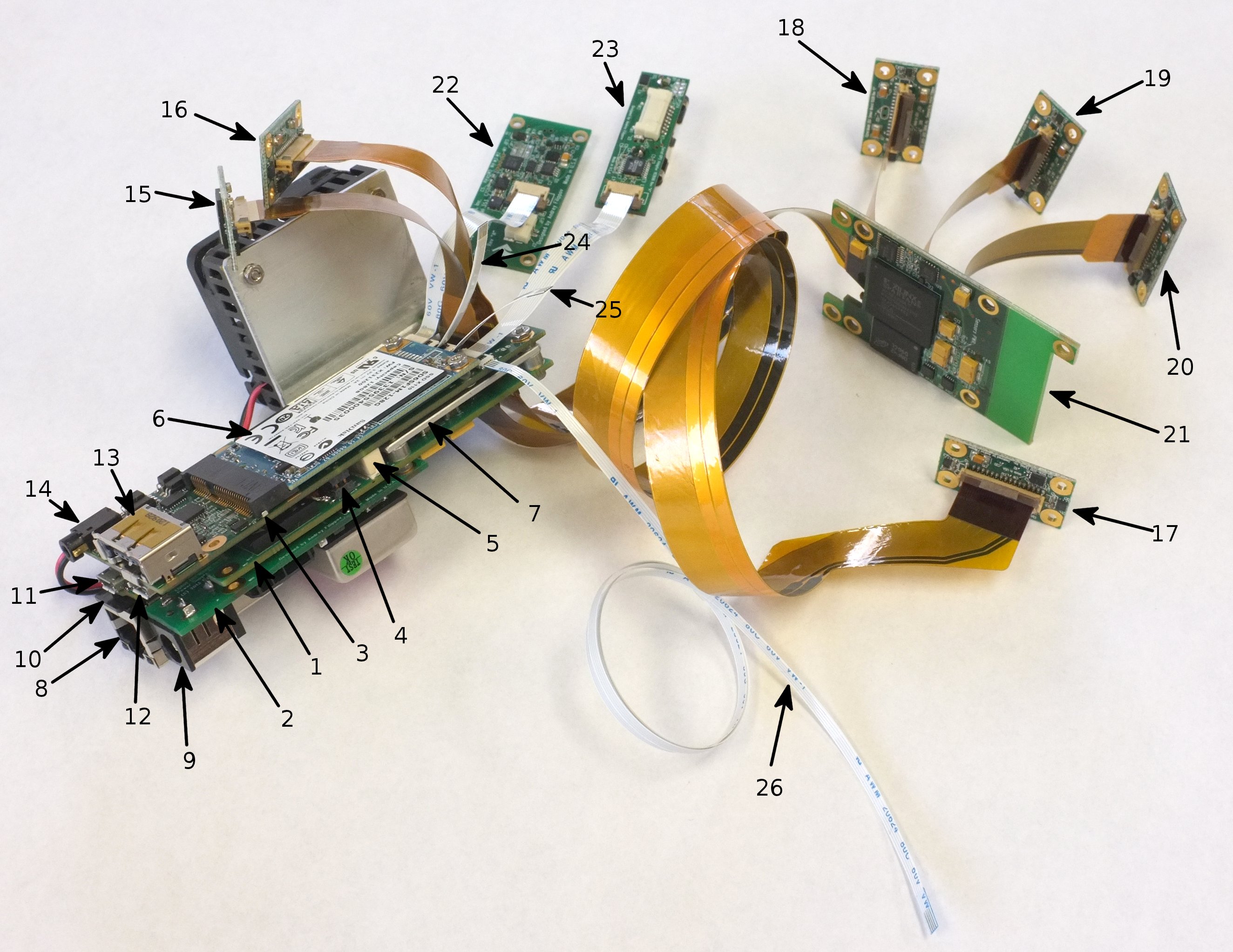
Sample configuration of the electronic modules of Elphel NC393 camera family
- 1 – 10393 Multisensor camera system board based on Xilinx Zynq 7030 SoC.
- 2 – 10385 Power supply board
- 3 – 10389 Interface board
- 4 – Inter-board power distribution: 6-pin (3 circuits) header on the 10385, receptacles on both 10393 and 10389
- 5 – Inter-board signal connector: 40 pins (USB, SATA, GPIO)
- 6 – mSATA SSD card
- 7 – Processor heat sink (temporary). Production cameras will have custom heat spreader to transfer CPU/FPGA generated heat to the camera aluminum body or other heat sinks in multicamera systems
- 8 – Ethernet (GigE) jack, РоЕ-compatible
- 9 – DC power input (9-36V or 18-72V depending on application)
- 10 – Memory card (can be used to boot the system for cold firmware update)
- 11 – Micro USB B connector for system serial console with GPIO signals to select boot mode and generate system reset. Mounted on the 10393 system board
- 12 – Micro USB A host connector for communication with external memory and I/O devices. Mounted on the 10389 interface board.
- 13 – USB A/eSATA combo connector. eSATA port will be used for interfacing external storage devices (HDD, SSD) and downloading data from the camera internal SSD to the host computer. USB portion of the connector can provide power to the external device through the same cable as SATA data.
- 14 – 2.5mm audio type connector for external synchronization input and output (opto-isolated and directly coupled)
- 15,16,17 – directly connected sensor front ends. Compatible with the current 5MPix 10338 (shown) and other parallel data output sensors, programmable interface voltage. With the controlled impedance cables same ports will allow using up to 9 differential lanes plus I2C and 2 extra control signals.
- 18,19,20 – sensor front ends connected through 21 – 10359 multiplexer that allows simultaneous acquisition of images from up to 3 sensors into on-board SDRAM and then transferring them to the system board. In the future we will develop a faster multiplexer supporting serial links to the sensors and/or the system.
- 22 – 103695 – IMU adapter board, or other "granddaughter" extension board connected to the 10389 interface (daughter) board. Two 10-pin connectors provide 3.3V and 5.0V power, USB and 4 GPIO connected to the FPGA pads through high speed voltage level shifters
- 23 – 103696 – Serial GPS adapter board with 1pps input, uses another "granddaughter" port.
- 24,25,26 – Inter-camera synchronization (daisy chain connection) for the systems with multiple camera boards located in the same enclosure, similar to the current Elphel Eyesis4pi cameras
The setup shown above is a sort of mockup – while all the components are real, we do not yet have software to run it, even to test it. So there is no sense in powering up such a system – nothing will happen. And there is a lot to be done before we will be able even to completely test the new hardware and prepare and release revision “A” of each of the prototyped boards. We plan to be ready by the middle of 2014.
10359
Fix:
← Older revision Revision as of 06:15, 7 November 2013 Line 1: Line 1: ==<font color=red>Fix</font>== ==<font color=red>Fix</font>== -There was an error recently discovered in the 10359 & 10359A boards - due to a wrong source the sensors (J2,J3,J4) were powered from the 10359's 2.5V instead of the correct 3V coming from 10353 - the result was almost not noticeable - vertical stripes with a 4-pixel period (only with 10338d boards) - [[10359_fix|FixGuide]].+There was an error discovered in 2011 in the 10359 & 10359A boards - due to a wrong source the sensors (J2,J3,J4) were powered from the 10359's 2.5V instead of the correct 3V coming from 10353 - the result was almost not noticeable - vertical stripes with a 4-pixel period (only with 10338d boards) - [[10359_fix|FixGuide]]. 10359B - [[Media:10359b_sch.pdf|10359 Circuit Diagram]], [[Media:10359b_gerber.tar.gz|10359 Gerber files]] 10359B - [[Media:10359b_sch.pdf|10359 Circuit Diagram]], [[Media:10359b_gerber.tar.gz|10359 Gerber files]] Andrey.filippovEzynq
← Older revision
Revision as of 23:15, 6 November 2013
Line 35:
Line 35:
<font size='2'> <font size='2'>
cd u-boot-xlnx cd u-boot-xlnx
- ./makeuboot {target}+ ./makeuboot <target>
-Supported {targets}:+Supported <targets>:
./makeuboot zynq_microzed_config ./makeuboot zynq_microzed_config
./makeuboot zynq_zc706_config ./makeuboot zynq_zc706_config
Oleg
Yocto tests
New page
==GIT==<font size='2'>
git clone -b dylan git://git.yoctoproject.org/poky.git
git clone -b dylan https://github.com/Xilinx/meta-xilinx.git poky/meta-xilinx
git clone git://git.code.sf.net/p/elphel/meta-elphel393 poky/meta-elphel393
</font>
==Configure==
* Step 1: Init environment
<font size='2'>
cd poky
. ./oe-init-build-env
</font>
* Step 2: Edit ''build/conf/bblayers.conf'' - add paths to BBLAYERS:
<font size='2'>
<absolute-path>/poky/meta-xilinx \
<absolute-path>/poky/meta-xilinx/meta-zedboard \
<absolute-path>/poky/meta-elphel393 \
</font>
* Step 3: Edit ''build/conf/local.conf'' - set MACHINE and other things:
<font size='2'>
BB_NUMBER_THREADS = "8" (depends on the PC's CPU)
PARALLEL_MAKE = "-j 8" (depends on the PC's CPU)
MACHINE ?= "zedboard" '''(?)'''
</font>
==Build kernel==
<font size='2'>
bitbake linux-xlnx
</font>
==Build ramdisk.image.gz==
<font size='2'>
bitbake elphel393
</font>
==Build toolchain==
* Step 1: build
<font size='2'>
bitbake meta-toolchain
</font>
* Step 2: install - launch installer from <some-path>/poky/build/tmp/deploy/ Oleg
Pages
